Architecture Walkthrough
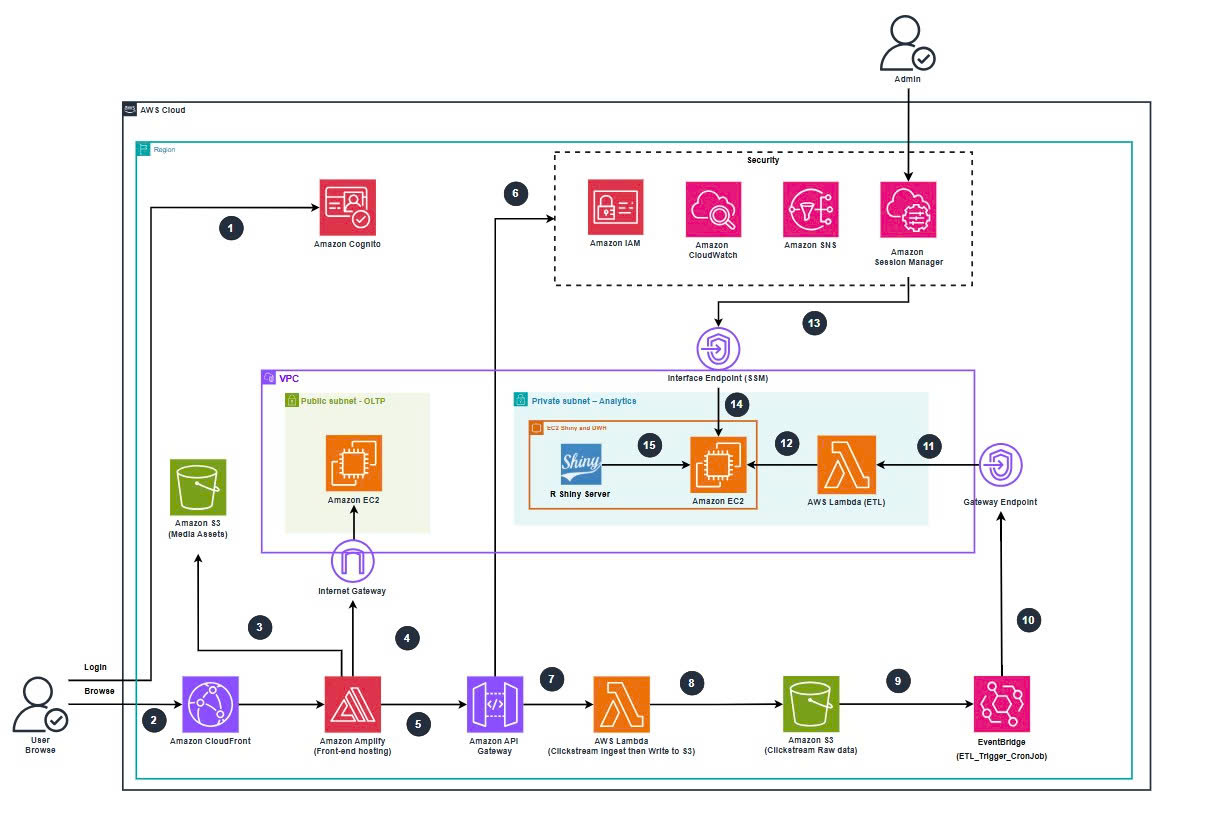
Figure: Architecture Batch-base Clickstream Analytics Platform.
5.2.1 User-Facing Domain
Frontend – Amplify + CloudFront + Cognito
- Next.js app:
ClickSteam.NextJS - Hosted by AWS Amplify Hosting with an integrated CloudFront distribution.
- Example URL:
https://main.d2q6im0b1720uc.amplifyapp.com/
- Amazon Cognito User Pool handles user registration, login, and ID tokens.
- The frontend:
- Renders product catalog pages (SSR)
- Uses Cognito tokens to know if a user is logged in
- Sends clickstream events to
clickstream-http-api
OLTP Database – SBW_EC2_WebDB (Public Subnet)
- EC2 instance:
SBW_EC2_WebDBin public subnetSBW_Project-subnet-public1-ap-southeast-1a - PostgreSQL listening on port
5432 - Database:
clickstream_web(schemapublic)
Tables include (simplified):
usersproductsordersorder_itemsinventory
The Amplify app connects via Prisma using DATABASE_URL to this EC2’s public endpoint.
In a stricter production design, this OLTP DB would typically be on Amazon RDS in private subnets behind an API layer. For this workshop, we accept a public EC2 DB to keep the focus on the analytics side.
5.2.2 Ingestion & Data Lake Domain
API Gateway HTTP API – clickstream-http-api
- Public HTTP API that exposes:
POST /clickstream
- Integration: Lambda
clickstream-lambda-ingest
Lambda Ingest – clickstream-lambda-ingest
- Stateless function (non-VPC) that:
- Receives JSON payloads from the frontend
- Validates and enriches the events (timestamps, session IDs, login state, product context…)
- Writes raw JSON to S3 bucket
clickstream-s3-ingestusing a path like:events/YYYY/MM/DD/event-<uuid>.json
IAM for this function is scoped down to:
s3:PutObjectonclickstream-s3-ingest- CloudWatch Logs permissions
S3 Raw Clickstream Bucket – clickstream-s3-ingest
- Region:
ap-southeast-1(Singapore) - Bucket for raw clickstream JSON only:
- No processed/curated data here
- Partitioning:
events/YYYY/MM/DD/
- File naming:
event-<uuid>.json
A separate bucket, clickstream-s3-sbw, hosts website assets (product images, static files) and is not used for raw clickstream events.
5.2.3 Analytics & Data Warehouse Domain
EC2 DW + Shiny – SBW_EC2_ShinyDWH (Private Subnet)
- EC2 instance in private subnet:
SBW_Project-subnet-private1-ap-southeast-1a - No public IP
- Attached IAM role with
AmazonSSMManagedInstanceCore
On this instance:
PostgreSQL Data Warehouse
- DB:
clickstream_dw(schemapublic) - Main table:
clickstream_eventswith fields:- Event info:
event_id,event_timestamp,event_name - User/session info:
user_id,user_login_state,identity_source,client_id,session_id,is_first_visit - Product context:
context_product_id,context_product_name,context_product_category,context_product_brand,context_product_price,context_product_discount_price,context_product_url_path
- Event info:
- DB:
R Shiny Server
- Listens on port
3838 - Hosts dashboard app:
sbw_dashboard - Local URL:
http://localhost:3838/sbw_dashboard
- Listens on port
ETL Lambda – SBW_Lamda_ETL (VPC-Enabled)
- Lambda function configured to run inside the VPC:
- Subnet:
SBW_Project-subnet-private1-ap-southeast-1a - Security group:
sg_Lambda_ETL
- Subnet:
- Environment variables:
DWH_HOST,DWH_PORT=5432,DWH_USER,DWH_PASSWORD,DWH_DATABASE=clickstream_dwRAW_BUCKET=clickstream-s3-ingestAWS_REGION=ap-southeast-1
The ETL Lambda:
- Lists new raw event files in
clickstream-s3-ingest/events/YYYY/MM/DD/ - Reads and parses JSON
- Converts them into rows for
clickstream_events - Inserts batched data into the Data Warehouse
EventBridge Rule – SBW_ETL_HOURLY_RULE
- Schedules ETL execution using:
rate(1 hour)
- Target:
SBW_Lamda_ETL - Ensures new clickstream events are processed at least once per hour.
5.2.4 Networking & Security Design
VPC & Subnets
- VPC CIDR:
10.0.0.0/16 - Public subnet:
10.0.0.0/20–SBW_Project-subnet-public1-ap-southeast-1a(OLTP EC2)
- Private subnet:
10.0.128.0/20–SBW_Project-subnet-private1-ap-southeast-1a(DW, Shiny, ETL)
Public Route Table
10.0.0.0/16 → local0.0.0.0/0 → Internet Gateway
Private Route Table
10.0.0.0/16 → local- S3 prefix list → Gateway VPC Endpoint for S3
- No
0.0.0.0/0to IGW or NAT Gateway
Key decision: No NAT Gateway.
Private components (DW, Shiny, ETL) reach S3 via the Gateway Endpoint, and are managed via SSM Interface Endpoints.
VPC Endpoints
- Gateway Endpoint for S3:
- Allows private access to
clickstream-s3-ingestfrom ETL Lambda and DW EC2.
- Allows private access to
- Interface Endpoints:
com.amazonaws.ap-southeast-1.ssmcom.amazonaws.ap-southeast-1.ssmmessagescom.amazonaws.ap-southeast-1.ec2messages
These enable SSM Session Manager traffic to stay within AWS private networking.
Security Groups
sg_oltp_webDB- Inbound:
5432/tcpfrom Amplify / admin IPs22/tcpfrom admin IP (optional; can be replaced by SSM)
- Inbound:
sg_analytics_ShinyDWH- Inbound:
5432/tcpfromsg_Lambda_ETL3838/tcpfor Shiny (accessed via SSM port forward only)
- Inbound:
sg_Lambda_ETL- Outbound to
sg_analytics_ShinyDWHon5432 - Outbound to S3 via Gateway Endpoint
- Outbound to
sg_ec2_VPC_Interface_endpoint_SSM- Inbound
443/tcpfrom private subnets for SSM endpoints
- Inbound
5.2.5 Mapping
- VPC + EC2 setup → see LAB1 – Networking & EC2
- S3 + Ingestion Lambda + API Gateway → see LAB2 – S3, Lambda Ingest & API Gateway
- ETL Lambda + EventBridge + DW → see LAB3 – EventBridge & Lambda ETL
- Amplify Frontend + Clickstream SDK → see LAB4 – Frontend (Amplify) & Clickstream SDK
- R Shiny + End-to-End validation → see LAB5 – R Shiny Analytics & Validation