Workshop
Batch-Based Clickstream Analytics Platform
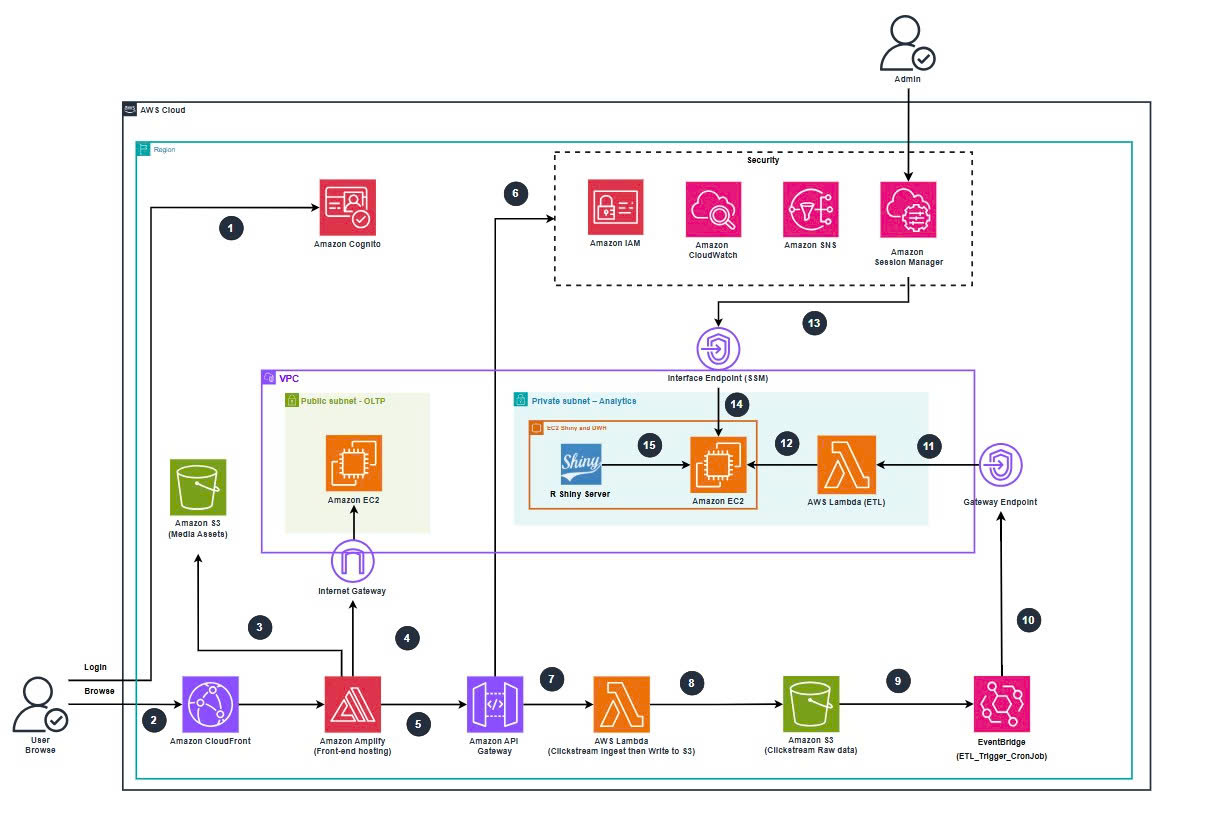
Figure: Architecture Batch-base Clickstream Analytics Platform.
Overview
This workshop implements a Batch-Based Clickstream Analytics Platform for an e-commerce website selling computer products.
The system collects clickstream events from the frontend, stores raw JSON data in Amazon S3, processes events via scheduled ETL (AWS Lambda + EventBridge), and loads analytical data into a dedicated PostgreSQL Data Warehouse on EC2 inside a private subnet.
Analytics dashboards are built using R Shiny, running on the same EC2 instance as the Data Warehouse, and accessed via AWS Systems Manager Session Manager.
The platform is engineered with:
- Clear separation between OLTP vs Analytics workloads
- Private-only analytical backend (no public DW access)
- Cost-efficient, scalable AWS serverless components
- Zero-SSH admin access via SSM Session Manager into the private DW / Shiny EC2
- You can run the Shiny app locally at localhost:3838
Key Architecture Components
Frontend & OLTP Domain
- Next.js app:
ClickSteam.NextJShosted on AWS Amplify Hosting - Amazon CloudFront as global CDN
- Amazon Cognito User Pool for authentication
- OLTP PostgreSQL on EC2:
SBW_EC2_WebDB(public subnet)- DB:
clickstream_web(schemapublic) - Port:
5432
- DB:
Ingestion & Data Lake Domain
- Amazon API Gateway (HTTP API):
clickstream-http-api- Route:
POST /clickstream
- Route:
- Lambda Ingest:
clickstream-lambda-ingest- Validates payload, enriches metadata, writes JSON files to S3
- S3 Raw Clickstream Bucket:
clickstream-s3-ingest- Prefix:
events/YYYY/MM/DD/ - File pattern:
event-<uuid>.json RAW_BUCKET = clickstream-s3-ingest
- Prefix:
Analytics & Data Warehouse Domain
Private EC2 for DWH + Shiny:
SBW_EC2_ShinyDWH(private subnet10.0.128.0/20)- DWH DB:
clickstream_dw - Main table:
clickstream_eventswith fields:event_id, event_timestamp, event_nameuser_id, user_login_state, identity_source, client_id, session_id, is_first_visitcontext_product_id, context_product_name, context_product_category, context_product_brandcontext_product_price, context_product_discount_price, context_product_url_path
- R Shiny Server on port
3838, web path/sbw_dashboard
- DWH DB:
Lambda ETL:
SBW_Lamda_ETL(VPC-enabled)- Reads raw JSON from
clickstream-s3-ingest - Transforms into SQL-ready rows
- Inserts into
clickstream_dw.public.clickstream_events
- Reads raw JSON from
EventBridge Rule:
SBW_ETL_HOURLY_RULE- Schedule:
rate(1 hour)
- Schedule:
VPC & Networking
- VPC CIDR:
10.0.0.0/16 - Public subnet:
10.0.0.0/20→SBW_Project-subnet-public1-ap-southeast-1a(OLTP EC2) - Private subnet:
10.0.128.0/20→SBW_Project-subnet-private1-ap-southeast-1a(DW, Shiny, ETL Lambda) - S3 Gateway VPC Endpoint for private S3 access
- SSM Interface Endpoints (SSM, SSMMessages, EC2Messages) for Session Manager
- VPC CIDR:
Admin Access (SSM)
- Port forwarding:
localPort = 3838portNumber = 3838
- Shiny URL from local:
http://localhost:3838/sbw_dashboard
- Port forwarding: