Mountpoint for Amazon S3 CSI driver v2: Accelerated performance and improved resource usage for Kubernetes workloads
by Ran Pergamin, Ankit Kalyani, Burak Varli, and Dmitry Nutels on 06 AUG 2025 in Advanced (300), Amazon CloudWatch, Amazon Elastic Kubernetes Service, Amazon Simple Storage Service (S3), AWS Identity and Access Management (IAM), Open Source, Storage, Technical How-to Permalink
Amazon S3 is the best place to build data lakes because of its durability, availability, scalability, and security. In 2023, we introduced Mountpoint for Amazon S3, an open source file client that allows Linux-based applications to access S3 objects through a file API. Shortly after, we took this one step further with the Mountpoint for Amazon S3 Container Storage Interface (CSI) driver for containerized applications. This enabled you to access S3 objects from your Kubernetes applications through a file system interface.
Users appreciated the high aggregate throughput that this CSI driver offered. However, you asked for a way to run Mountpoint processes inside containers (not on the host) and without elevated root permissions. This redesign provides three key benefits: (1) free up systemd resources on the host for other operational needs; (2) let pods on the same node share the Mountpoint pod and its cache. By using the new caching capabilities in Mountpoint for Amazon S3 CSI driver v2, you can finish large-scale financial simulation jobs up to 2x faster by eliminating the overhead of multiple pods individually caching the same data; and (3) compatibility with Security-Enhanced Linux (SELinux) enabled Kubernetes environments such as Red Hat OpenShift. That is why we released the first major upgrade: Mountpoint for Amazon S3 CSI driver v2.
In this post, we dive into the core components of this driver, the key benefits of using it to access S3 from your Kubernetes applications, and a real-world illustration of how to use it.
How we built the Mountpoint for Amazon S3 CSI driver v2
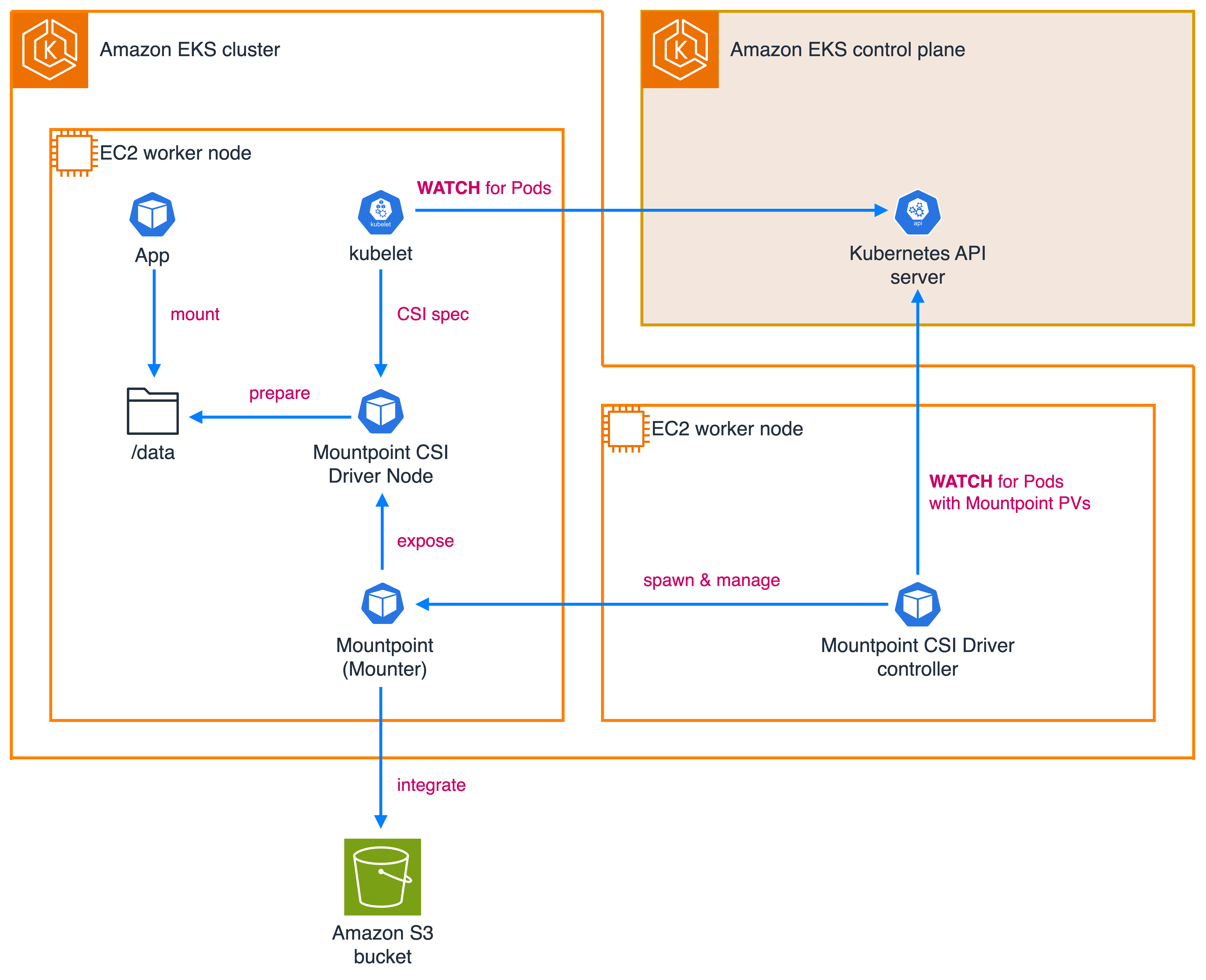
We built this CSI driver with the following three main components (shown in the diagram below):
- CSI driver node: Deployed as a DaemonSet on each node. This component implements the CSI Node Service RPC and handles mount operations. It communicates with the kubelet and manages the lifecycle of Mountpoint instances.
- CSI driver controller: Schedules a Mountpoint pod on the appropriate node for each workload pod that uses S3 volumes. It uses a custom resource called
MountpointS3PodAttachmentto track which workloads are assigned to which Mountpoint pods. - CSI driver Mounter/Mountpoint pod: These pods run the Mountpoint instances. They receive mount options from the CSI Driver Node and spawn Mountpoint processes within their containers.
Overview of the key benefits
Mountpoint for Amazon S3 CSI driver v2 offers the following key benefits:
- Efficient resource usage for nodes in your Kubernetes cluster when pods on the same Amazon EC2 instance share a common Mountpoint pod.
- Optimized performance and reduced cost for repeatedly accessed data when pods share the local cache.
- Streamlined credential management with EKS Pod Identity provided by Amazon Elastic Kubernetes Service (Amazon EKS).
- Compatibility with SELinux requirements, enabling regulatory compliance and supporting Red Hat OpenShift environments.
- Improved observability with Mountpoint pod logs available via
kubectl logs, plus optional Amazon CloudWatch integration through the CloudWatch Observability EKS add-on.
In the following section, we explore how this driver improves resource usage, accelerates performance, and streamlines credential management.
Efficient resource usage for Kubernetes nodes
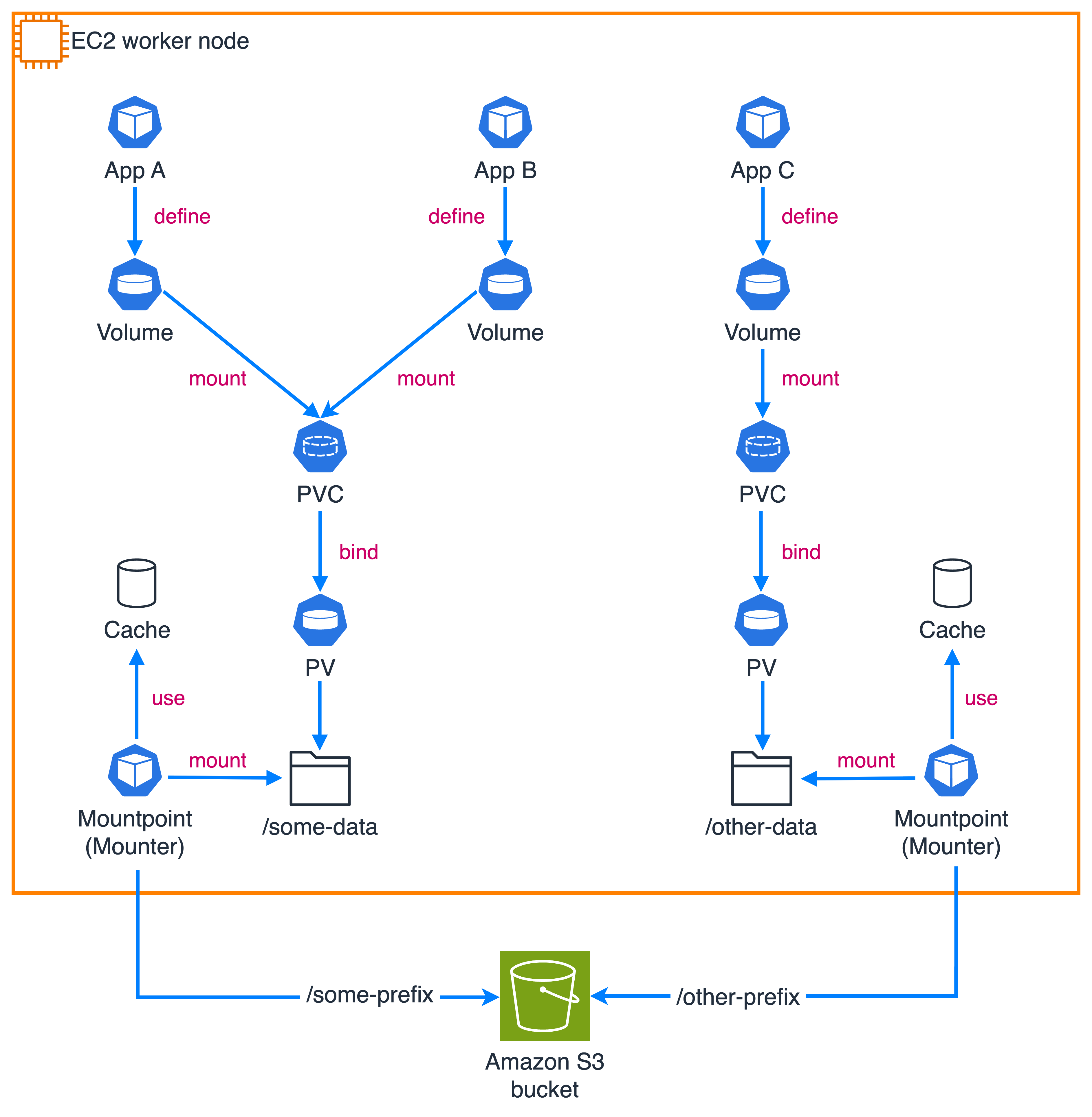
Mountpoint for Amazon S3 CSI driver v2 allows you to run a single Mountpoint instance and share it among multiple worker pods (as shown in the figure) on the same node when those pods have identical configuration parameters such as namespace, service account name, or source of authentication. This improves resource usage in your Kubernetes clusters so you can launch more pods per node.
Optimized performance and reduced cost for repeatedly accessed data
The driver lets you locally cache frequently accessed data and share that cache across pods on the same node. When you configure caching, it automatically creates the cache folder for you. You can control cache size and storage characteristics, choosing to cache on either an emptyDir volume (using the node’s default storage medium) or a generic ephemeral volume. By using these new caching capabilities, you can complete large-scale financial simulation jobs up to 2x faster by eliminating the overhead of multiple pods individually caching the same data.
Streamlined credential management with EKS Pod Identity
This major upgrade adds support for EKS Pod Identity, a simpler and more scalable alternative to IAM Roles for Service Accounts (IRSA) to manage access policies across EKS clusters, including cross-account access. EKS Pod Identity can be installed as an Amazon EKS add-on.
When you use EKS Pod Identity, you do not need to create a separate OpenID Connector (OIDC) provider per cluster. The namespace and the service account do not have to exist ahead of time, which simplifies onboarding. EKS Pod Identity also supports attaching session tags to the temporary credentials associated with a service account, enabling Attribute-based access control (ABAC). Pod Identity provides tags for namespace, kubernetes-service-account, and eks-cluster-name so you can control access at the desired levels of granularity.
The driver can be configured with two types of credentials:
- Driver-level credentials: a single set of permissions associated with the service account of the driver, used for pods in the cluster.
- Pod-level credentials: credentials associated with each pod’s service account, which configure access permissions for that pod.
Using pod-level credentials with EKS Pod Identity and session tags enables scalable, multi-tenant solutions. For example, with EKS Pod Identity, you can define clauses in AWS Identity and Access Management (IAM) policies attached to the IAM role associated with a service account using session tags:
{
  "Version": "2012-10-17",
  "Statement": [
    {
      "Effect": "Allow",
      "Action": ["s3:GetObject"],
      "Resource": [
        "arn:aws:s3:::some-bucket/s3mp-apps-data/shared/*",
        "arn:aws:s3:::some-bucket/s3mp-apps-data/${aws:PrincipalTag/kubernetes-namespace}/*"
      ]
    }
  ]
}
Example usage patterns for Mountpoint for Amazon S3 CSI driver v2
The following example demonstrates the driver in action. It assumes the driver is installed and configured to access the corresponding S3 bucket and prefixes using EKS Pod Identity or IRSA.
Creating a PersistentVolume
To let applications handle the files in the S3 bucket as if they were in a local directory, create a PersistentVolume (the driver currently supports Kubernetes static provisioning):
apiVersion: v1
kind: PersistentVolume
metadata:
  name: s3mp-data-pv
spec:
  storageClassName: '' # Required for static provisioning
  capacity:
    storage: 1Gi # Ignored, required
  accessModes:
    - ReadWriteMany
  claimRef: # To ensure no other PVCs can claim this PV
    namespace: apps
    name: s3mp-data-pvc
  mountOptions:
    - region: eu-central-1
    - prefix data/
  csi:
    driver: s3.csi.aws.com # Required
    volumeHandle: my-s3-data-volume # Must be unique
    volumeAttributes:
      bucketName: mp-s3-bucket-<some unique suffix>
      cache: emptyDir
      cacheEmptyDirSizeLimit: 1Gi
      cacheEmptyDirMedium: Memory
The PersistentVolume defines:
- Storage capacity (mandated by the CSI spec but unused)
- Access modes
- The bucket (name and region) to use
- The size and location of the cache used by the driver’s Mountpoint pods
Using the PersistentVolume
Now create an application that uses the preceding PersistentVolume:
apiVersion: v1
kind: PersistentVolumeClaim
metadata:
  name: s3mp-data-pvc
  namespace: apps
spec:
  storageClassName: ''
  accessModes:
    - ReadWriteMany
  resources:
    requests:
      storage: 1Gi
  volumeName: s3mp-data-pv
---
apiVersion: apps/v1
kind: Deployment
metadata:
  name: some-app
  namespace: apps
spec:
  replicas: 2
  selector:
    matchLabels:
      name: some-app
  template:
    metadata:
      labels:
        name: some-app
    spec:
      nodeName: ip-10-0-82-168.eu-central-1.compute.internal
      containers:
        - name: app
          image: busybox
          command: ['sh', '-c', 'trap : TERM INT; sleep infinity & wait']
          volumeMounts:
            - name: data
              mountPath: /data
      volumes:
        - name: data
          persistentVolumeClaim:
            claimName: s3mp-data-pvc
This defines:
- A PersistentVolumeClaim that uses the PersistentVolume
- A requested storage capacity (required by the CSI spec but unused)
- A
storageClassNamethat must match the PersistentVolume - An application that mounts the PersistentVolumeClaim under
/data
We forced both application replicas onto the same worker node to demonstrate the caching capability.
Verifying the deployment
The created PV and PVC and the deployed application look similar to the following (with some data abridged for clarity):
$ kubectl get pods -n apps -o wide

NAME                         READY   STATUS    AGE     IP            NODE
some-app-556c9447fd-sjf4k   1/1     Running   3m14s   10.0.94.129   ip-10-0-85-106.eu-central-1.compute.internal
some-app-556c9447fd-wkpbv   1/1     Running   3m14s   10.0.89.177   ip-10-0-85-106.eu-central-1.compute.internal

$ kubectl get pv,pvc -n apps

NAME                         CAPACITY   ACCESS MODES   RECLAIM POLICY   STATUS   CLAIM               STORAGECLASS   VOLUMEATTRIBUTESCLASS   REASON   AGE
persistentvolume/s3mp-data-pv   1Gi     RWX            Retain           Bound    apps/s3mp-data-pvc                                      <unset>           4m

NAME                             STATUS   VOLUME         CAPACITY   ACCESS MODES   STORAGECLASS   VOLUMEATTRIBUTESCLASS   AGE
persistentvolumeclaim/s3mp-data-pvc   Bound   s3mp-data-pv   1Gi        RWX
When the application is deployed, the driver creates a Mountpoint pod on each node where the pods are running (a single one in this case) to set up pod sharing and allow other pods on the node to access the local cache.
$ kubectl get pods -n mount-s3 -o wide

NAME       READY   STATUS    AGE     IP            NODE
mp-xgscz   1/1     Running   3m48s   10.0.94.38    ip-10-0-85-106.eu-central-1.compute.internal
Using the cache
Access one of the files in the mounted bucket’s data/ prefix to see caching in action by downloading and counting words in a 2.5 MB file:
$ POD_ID=$(kubectl get pod -n apps -l name=some-app -o jsonpath='{.items[0].metadata.name}')
$ echo ${POD_ID}

some-app-556c9447fd-sjf4k

$ kubectl exec -it -n apps ${POD_ID} -- time wc /data/some-file

  129419    130195   2424064 /data/some-file
 real    0m 0.22s
 user    0m 0.01s
 sys     0m 0.00s

$ POD_ID=$(kubectl get pod -n apps -l name=some-app -o jsonpath='{.items[1].metadata.name}')
$ echo ${POD_ID}

some-app-556c9447fd-wkpbv

$ kubectl exec -it -n apps ${POD_ID} -- time wc /data/some-file

  129419    130195   2424064 /data/some-file
 real    0m 0.09s
 user    0m 0.01s
 sys     0m 0.00s
Because the word counting on the same instance takes roughly the same time, you can see the difference the cache makes in the real times above.
Upgrading from Mountpoint for Amazon S3 CSI driver v1 to v2
To install the driver, follow the installation guide. If you are upgrading from v1, note that the new release changes how volumes are configured. Review the list of configuration changes before upgrading so you can adjust accordingly.
At the time of writing, v2 has some constraints when working with node autoscalers such as Karpenter and Cluster Autoscaler. See the related GitHub issue for details.
Conclusion
Mountpoint for Amazon S3 CSI driver v2 improves how Kubernetes applications interact with S3 data: pod sharing for better resource usage and speed, SELinux support, logging via kubectl, and simpler access management with Amazon EKS Pod Identity. The driver is available on GitHub; we welcome your feedback and contributions.
Tags: Amazon CloudWatch, Amazon Elastic Kubernetes Service (EKS), Amazon Simple Storage Service (S3), AWS Identity and Access Management (IAM), Open Source

Ran Pergamin
Ran Pergamin is a Software Engineer at AWS working on Amazon S3, focused on building storage solutions and large-scale data access tools.

Ankit Kalyani
Ankit Kalyani is a Senior Software Engineer at AWS specializing in distributed systems and storage, with a focus on performance and scalability for Amazon S3.

Burak Varli
Burak Varli is a Senior Solutions Architect at AWS who helps customers build and optimize storage workloads, especially in Kubernetes and containerized environments.

Dmitry Nutels
Dmitry Nutels is a Principal Software Engineer at AWS leading development of storage and large-scale data access tools, including Mountpoint for Amazon S3 and related CSI technologies.